Zero Line Getting Started Guide
Join the group, launch your first FPV drone, claim missions, and spend cash where it matters.
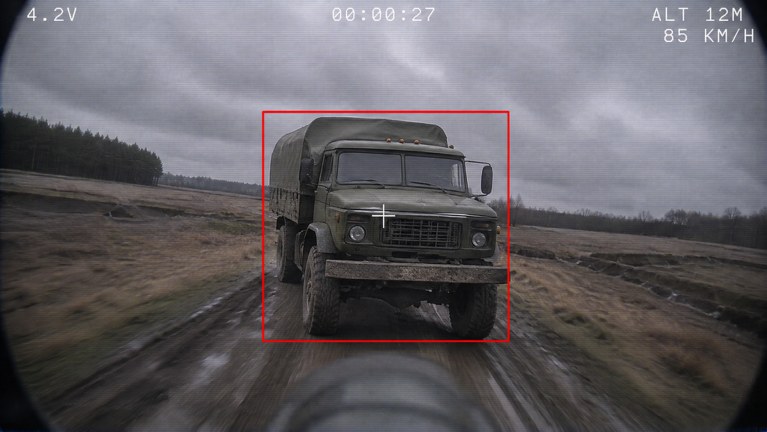
Zero Line is Pushpin Gaming’s first-person FPV drone kamikaze experience on Roblox. You dive into enemy players, trucks, and helicopters, trade shots with rival drones, and spend cash on batteries, propellers, antennas, night vision, and thermal cameras across a 55-level progression path. Servers support online multiplayer with up to 18 players on PC, mobile, tablet, and console. This day-one guide gets you from join screen to a useful loadout without wasting early cash.
If you only have fifteen minutes, follow this order: join the experience, join the Pushpin Gaming group for the cash bonus, learn the basic flight keys from the controls guide, claim daily and weekly missions, then buy the first battery and propeller upgrades. Everything else—skins, outfits, and deep antenna or camera builds—can wait until you understand how long your drone stays airborne and how kamikaze runs actually pay out.
Launch the game and join Pushpin Gaming
Open the official Zero Line experience on Roblox and join a live server. After you load in, find the Pushpin Gaming group link from the experience page or in-game prompts and join the group before you grind. Group membership grants +20% cash, which compounds every successful run, mission payout, and upgrade cycle. Skipping the group on day one is the most common early mistake; every later purchase becomes more expensive in relative terms if you farm without the bonus.
Once you are in a server, open Settings and note the FEEDBACK/BUG option. If something breaks—stuck spawn, missing mission credit, odd control binding—report it there instead of assuming the wiki is wrong. Pushpin updates frequently, and early-access quirks show up most often around missions and vision toggles.
Your first FPV flight
Zero Line puts you in the pilot seat of a combat FPV drone. Typical first-session goals are simple: get airborne, stay level, locate a soft target, and either shoot another drone or commit a kamikaze strike into a player, truck, or helicopter. Do not try to master thermal hunting on flight one. Treat the first sorties as battery and camera practice.
Before you dive, skim the how to fly FPV page for approach angles and battery discipline, and keep the controls page open if you swap between keyboard and touch. On PC, expect WASD strafing with mouse look, rise and descend on dedicated keys, and a toggle for thermal or night vision once those modules are unlocked. Mobile and console use on-screen sticks or gamepad axes with the same rise, fire, and kamikaze ideas—labels can sit under Settings, so check bindings if a button does nothing.
Land or bail before your battery hits empty whenever possible. A dead drone mid-dive teaches less than a controlled return with cash in pocket. After two or three short flights you should know whether your limiting factor is flight time, speed, or visibility—that answer decides your first upgrade.
Claim daily and weekly missions immediately
Zero Line runs daily and weekly missions on top of the main 55-level track. Claim or activate them as soon as the UI allows so every early kill and flight counts twice: once for raw cash and once for mission progress. Mission objectives usually line up with normal play—fly, destroy, survive—so you do not need a special farming route on day one. When a 2X XP banner or event is live, prioritize finishing weekly tasks first; they take longer and benefit more from the multiplier.
For a deeper look at rotation timing, level pacing, and XP windows, read missions and levels. Pair that page with the updates hub whenever a patch notes new mission types or level caps.
What to upgrade first
You start with access to a small drone roster (three drones in the current design) and a clear upgrade board: batteries, propellers, antennas, night vision, and thermal cameras, plus cosmetic camo skins and outfits. Cash is tight early. Spend in this priority unless a mission specifically demands a vision module:
- Battery — more airtime means more chances to line up a kamikaze or win a drone duel.
- Propellers — better speed and climb help you close on trucks and helicopters before they leave your sector.
- Antenna — improves connection feel and control reliability at range; useful once you stop crashing into the nearest hill.
- Night vision — unlock when maps go dark or you keep losing targets in shadow.
- Thermal camera — best for spotting players and vehicles by heat; buy after you can stay alive long enough to use it.
Camo skins and outfits are optional. Buy them after your combat modules feel playable, not before. Full module explanations, cash order, and loadout notes live on the drone upgrades guide and the upgrade priority tier list. When you are ready to compare airframes, open the drones tier list.
Codes, feedback, and staying current
Check the codes hub whenever you launch. Promo codes often drop cash or XP boosts that accelerate the same battery and propeller purchases this guide recommends. Redeem anything active before a long session so the bonus applies to the runs you already planned.
After your first hour you should have: group bonus active, at least one battery upgrade, missions claimed, and a mental map of where soft targets spawn. From there, deepen flight skill with how to fly FPV, refine bindings in controls, and keep grinding levels through missions and levels. Use Settings → FEEDBACK/BUG if a mission fails to credit, and re-check this wiki after major patches listed on updates.
Day-one checklist
- Join Zero Line and the Pushpin Gaming group for +20% cash.
- Confirm platform controls (PC, mobile, tablet, or console) and open Settings if a bind is missing.
- Complete two short flights focused on battery awareness, not perfect kills.
- Claim daily and weekly missions; note any 2X XP event.
- Buy battery, then propellers, before cosmetics.
- Redeem any live entries on codes.
- Bookmark drone upgrades and how to fly FPV for session two.
Play the objective that matches your current drone: early batteries favor patient truck and player hunts; stronger propellers favor aggressive helicopter intercepts. Stay inside your battery budget, cash out upgrades that extend fights, and let missions pull you through the 55-level curve instead of chasing every cosmetic on day one.
Frequently Asked Questions
Quick answers for Zero Line pilots.
What should I do first in Zero Line?
Join the Pushpin Gaming group for +20% cash, complete a short practice flight, claim daily and weekly missions, then buy a battery upgrade before cosmetics.
Does joining the Pushpin Gaming group still matter?
Yes. Group membership gives +20% cash, which speeds every upgrade cycle. Join before you grind long sessions.
Which upgrade should I buy first?
Battery first for airtime, then propellers for speed and climb. Save antennas, night vision, thermal cameras, and camo until basic flight feels stable.
Where do I report bugs or send feedback?
Open Settings in-game and use the FEEDBACK/BUG option so Pushpin Gaming can see the report.
Is Zero Line available on mobile and console?
Yes. The experience supports PC, mobile, tablet, and console in online multiplayer servers with up to 18 players.