Zero Line Codes
Redeem guide, live status, and where new FPV drone promos appear first.
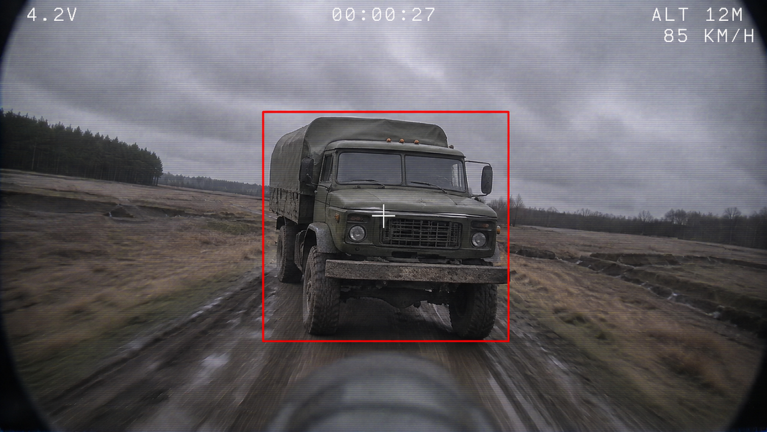
Zero Line is a new Roblox FPV drone kamikaze experience from Pushpin Gaming, released on 20 October 2026. Players search this hub for free cash, XP boosts, skins, and upgrade materials. Because the game is still early, no permanent public promo codes are confirmed at the time of writing. Treat any random string you see in chat as unverified until it appears in an official group shout, an in-game announcement, or this page after we re-check it.
This Codes Hub explains how redemption usually works on Roblox action games, where to watch for real drops, and what to do while you wait. Pair it with the Getting Started guide so early cash goes into batteries and propellers instead of cosmetics you will outgrow.
Current code status
| Status | Detail |
|---|---|
| Active public codes | None confirmed |
| Last community sweep | Ongoing — recheck after 2x XP title changes |
| Best free bonus today | Join the Pushpin Gaming group for +20% cash (see Players) |
| Milestone / like codes | Not publicly documented for Zero Line yet |
When a working code is verified, this table will list the string, reward, and any expiry note. Until then, do not spam unknown codes into every UI field — mistyped entries waste time and can lock a redeem button for a short cooldown on some experiences.
How to redeem codes when they appear
Pushpin Gaming has not published a dedicated public codes FAQ yet. On similar Roblox FPV and combat titles, redemption usually follows one of these patterns. Check each spot the first time a code drops so you know Zero Line’s exact flow:
- Settings gear — Open the gear icon, look for Codes, Redeem, Gifts, or Promos. Some builds hide the field under a social or shop tab.
- Shop / Store panel — Scroll past Game Passes for a text box labeled Codes or Discord Codes.
- HUD button — A ticket, gift, or Twitter/X icon near cash or missions.
- Group join verify — Separate from typed codes: joining Pushpin Gaming unlocks the +20% cash bonus after you rejoin the place.
Redeem checklist
- Launch Zero Line on Roblox and wait for the full HUD.
- Copy the code exactly — codes are almost always case-sensitive.
- Paste into the Codes field with no leading or trailing spaces.
- Press Redeem / Claim once; wait for a success toast before retrying.
- Rejoin if cash or inventory does not refresh within a few seconds.
If the UI has no Codes field yet, the build simply has not shipped redemption. Bookmark this hub and watch the Updates page when the place title flips to events like [2X XP].
Where new Zero Line codes usually appear
Honest sources beat leaked spreadsheets:
- Pushpin Gaming group shout — primary channel for group-linked bonuses and patch notes.
- In-game title and banners — 2x XP and limited events often show in the Roblox experience name before a typed code exists.
- Settings → FEEDBACK/BUG — not a code feed, but the place developers ask for reports; large update waves sometimes land with rewards.
- This wiki — we list only codes we can describe with rewards and a clear redeem path; see also Players for community etiquette.
Ignore DMs that sell “private Zero Line codes,” ask you to download an executor for free cash, or demand account login. Those are scams.
What to do instead of waiting on codes
Free progression still exists without promos:
- Complete daily and weekly missions for steady cash.
- Join the creator group for the permanent +20% cash multiplier.
- Spend early earnings on batteries, propellers, and antennas before camo skins — see the Tier List Hub for upgrade priorities and Guides for combat fundamentals.
- Play during advertised 2x XP windows tracked on Updates to climb the 55-level track faster.
Zero Line’s loop — FPV dives into players, trucks, and helicopters, gun fights against enemy drones, and kamikaze strikes — rewards map knowledge more than a single lucky code. Use codes as a bonus layer, not your main economy.
Reporting a working code
If you redeem a string that grants cash, XP, or a skin, note the exact spelling, reward text, platform (PC/mobile/console), and whether it worked after a rejoin. Share that detail through community channels listed on the Players hub so this page can stay accurate. Expired codes will move to an Expired section instead of disappearing silently.
Related pages
- Getting Started — first-hour controls and upgrade path
- Updates Hub — 2x XP and patch tracking
- Players Hub — group join bonus and feedback tips
- Scripts Hub — executor risk warnings (codes never require scripts)
- Links Hub — official Roblox game and group URLs
Frequently Asked Questions
Quick answers for Zero Line pilots.
Are there any working Zero Line codes right now?
No permanent public promo codes are confirmed yet. Join the Pushpin Gaming group for +20% cash and recheck this page after major updates or 2x XP events.
Where do I redeem Zero Line codes in-game?
Look under Settings, Shop, or a Codes/Gifts HUD button. Exact placement can change with patches — if no field exists, typed codes are not live in that build.
Why did my code fail?
Common causes: expired string, wrong capitalization, extra spaces, already redeemed on the account, or a fake code from chat. Try once more after a rejoin, then wait for an official drop.
Do I need a script or executor to claim codes?
No. Real Roblox promo codes redeem inside the game UI only. Anything that asks you to run a script for codes is unsafe — read the Scripts Hub warnings.
What is the best free bonus without codes?
Join the Pushpin Gaming Roblox group for +20% cash, finish daily and weekly missions, and play during 2x XP title events listed on the Updates Hub.